
Sync Meta Audiences in Real Time
Keep Meta Custom Audiences up-to-date by syncing via Pixel, Conversions API, or reverse-ETL in real time to improve match rates and cut ad waste.
Syncing Meta audiences in real time ensures your ads stay relevant by instantly updating your target lists. When users take actions like signing up, adding to their cart, or making a purchase, these changes are reflected in Meta within seconds. This prevents showing ads to people who’ve already converted, saving ad spend and improving targeting accuracy.
Key Takeaways:
Budget Efficiency: Stop wasting money on ads for converted users.
Precise Targeting: Add new leads and retarget cart abandoners instantly.
Improved Match Rates: Pair Meta Pixel with Conversions API to boost event match quality by up to 20%.
Tools Needed: Meta Pixel, Conversions API, and reverse-ETL platforms like Hightouch.
To get started, ensure your Meta account is set up, data sources are clean, and necessary API setup for Meta audience sync is in place. Use hashed identifiers (emails, phone numbers) and monitor your Event Match Quality score to maintain high performance. Automate syncing via platforms like Klaviyo or Hightouch for seamless updates, and leverage AI tools for Meta ads to optimize campaigns further.
Real-time syncing transforms how you manage Meta campaigns, keeping your ads efficient and relevant.
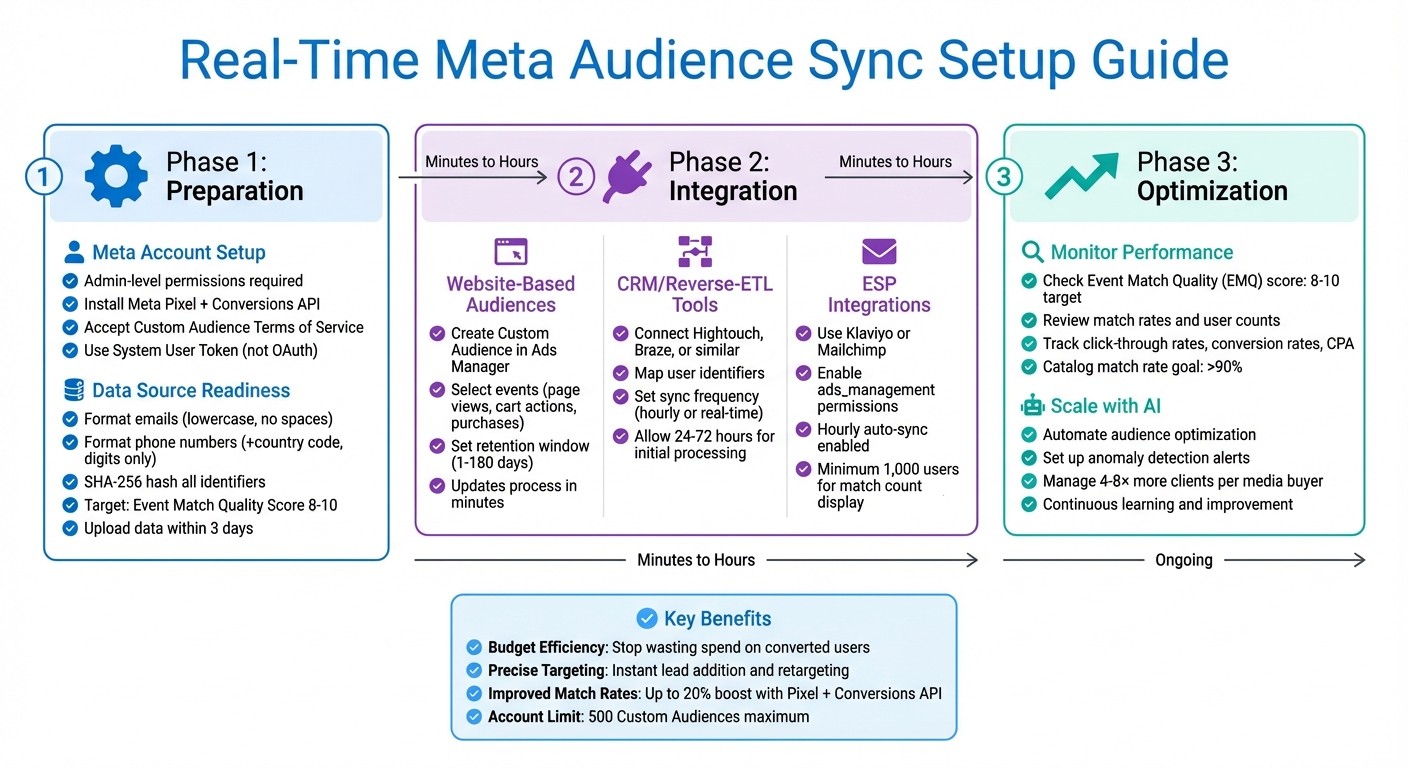
Real-Time Meta Audience Sync Setup: 3-Phase Implementation Guide
Preparing to Sync Meta Audiences in Real Time
Meta Account and Pixel Setup
To get started, you’ll need Admin-level permissions in Meta Business Manager and full control over your Ad Account. Without these, you won’t be able to create or update audiences through any integration tool.
Make sure to follow Meta API integration best practices to install both the Meta Pixel and the Conversions API on your website. The Pixel tracks user activity in real time, while the Conversions API sends server-side data directly to Meta. These tools work together to improve your Event Match Quality (EMQ) score, which is rated on a scale from 1 to 10. A score between 8 and 10 indicates effective user identification and strong matching.
Next, manually accept the Meta Custom Audience Terms of Service for each ad account. If you skip this step, your sync will fail, and you’ll see a "Terms not yet accepted" error. To accept, go to the Audiences section in Meta Ads Manager, start creating a manual custom audience, and follow the prompt to agree to the terms.
For authentication, it’s best to use a System User Token instead of OAuth. OAuth tokens expire every 60 days, while a System User Token provides indefinite access. To set this up, create a system user in Business Settings, assign the app and ad account as assets with "Full Control", and generate a permanent token.
Data Source Readiness
Once your account and tracking tools are configured, focus on preparing your data sources for syncing.
Your CRM or customer engagement platform must include key user identifiers like email addresses, phone numbers, and external IDs. Meta uses these details to match users and build Custom Audiences.
Formatting is crucial. Emails should be in lowercase and free of spaces. Phone numbers must include the country code (e.g., +1 for the US) and consist of digits only - no dashes or parentheses. Both emails and phone numbers need to be SHA-256 hashed before sending to Meta. Most integration tools handle this automatically, but it’s worth double-checking that this feature is enabled in your setup.
Regularly monitor your Event Match Quality score in Meta Events Manager. High-quality offline data, with scores of 8.5 or higher, supports effective omnichannel ad campaigns. If your score is low, it might indicate missing identifiers or improperly formatted data. Meta advises uploading offline transaction data daily and ensuring it’s no older than 3 days.
Remember, Meta limits each ad account to 500 custom audiences. If you’re nearing this limit, archive or delete older audiences to make room for new ones.
Integration Prerequisites
Once your data is properly formatted, you’ll need to set up the required API integrations.
Platforms like Hightouch, Klaviyo, and Mailchimp typically require specific API permissions to sync audiences. The two key permissions are ads_management (for creating and updating audiences) and ads_read (for accessing performance data).
Ensure your integration tool is authenticated correctly. If you’re using a System User Token, verify that it’s been generated and assigned to the appropriate ad account.
Test your connection in Meta’s Events Manager. Look for incoming events and confirm the deduplication window is set properly: 48 hours for web events and 7 days for offline events. This step ensures Meta doesn’t count the same event multiple times.
Some integration tools offer features like Match Booster, which enriches your data before sending it to Meta. If your platform includes this feature, enable it. It can significantly improve match rates, leading to larger audience sizes and more precise targeting.
How to Set Up Real-Time Audience Sync
Setting Up Website-Based Audiences in Meta
With your Pixel and Conversions API up and running, head to Meta Ads Manager and navigate to the Audiences section. From there, click on "Create Audience", select "Custom Audience", and choose "Website" as your source. You'll then see a list of events tracked by your Pixel - such as page views, add-to-cart actions, purchases, and any custom events you've set up.
Pick the event that defines your audience. For example, you can target visitors to your pricing page in the past 30 days or users who abandoned their carts within the last 7 days. Set a retention window (anywhere from 1 to 180 days) that aligns with your sales cycle. To keep things organized, name your audience descriptively, like "Cart Abandoners - Last 7 Days", so you can easily identify it later.
The great thing about website-based audiences is that they update almost instantly. When someone triggers an event - like visiting your site at 2:00 PM - they become eligible for retargeting within minutes. This near-instant update is a major advantage over manual uploads, which can take hours to process.
Configuring CRM and Reverse-ETL Integrations
Once your data sources are ready, you can integrate them to sync directly with Meta. Tools like Hightouch and Braze allow you to pull customer data from platforms like Snowflake, BigQuery, or your CRM, and push it into Meta Custom Audiences. For example, in Hightouch, you can create a "Model" to define which users to sync - like customers who spent over $500 in the last 90 days.
Next, map the necessary identifiers as specified during the setup process. In your sync settings, decide if users should be added, removed when they no longer meet the criteria, or both. To ensure users are excluded once they leave a segment (e.g., after making a purchase), set the "Delete Behavior" to "Remove from list".
Choose a sync frequency based on your campaign needs. Hourly updates work for regular campaigns, while real-time syncing is better for time-sensitive efforts. Keep in mind that while tools like Hightouch sync instantly, Meta may take up to 24 hours to fully process large audience updates. After your first sync, allow 72 hours for match rates to stabilize in Meta Ads Manager.
Using ESP Integrations for Audience Sync
Email service providers (ESPs) also offer native Meta syncing, giving you another option for managing audience data. Platforms like Klaviyo and Mailchimp make this process straightforward. In Klaviyo, go to Integrations, select Meta, and authenticate your account with ads_management permissions.
Create a segment in your ESP - for example, subscribers who opened your last three emails but haven’t purchased in 60 days. Enable the Meta sync toggle, and Klaviyo will hash and normalize the data before syncing it. By default, Klaviyo syncs this data hourly, sending hashed email addresses and phone numbers directly to Meta.
For Mailchimp, start by creating a tag or segment. Then, navigate to the Meta integration settings and select the lists you want to sync. Make sure your ESP fields are clean - rows with null values can cause errors like "Error Code 400: Missing schema attribute".
Once the sync is complete, your audience will appear in Meta Ads Manager within a few hours. Keep in mind that Meta won’t show a match count until your audience exceeds 1,000 users, as they use approximations to maintain privacy standards.
Monitoring and Troubleshooting Audience Sync
Verifying Synced Audiences in Meta
To confirm your audiences are syncing correctly in Meta Ads Manager, check the "Availability" status for each audience. A status marked as "Ready" indicates the sync was successful.
Take a look at the "Matched User Count" and "Match Rate" to gauge how well your data is connecting. Keep in mind that Meta may display "1,000" as a placeholder for small or processing audiences.
For more detailed information, head to Events Manager and open the "Event Quality" tab. Here, you'll find your Event Match Quality (EMQ) score, which ranges from 1 to 10. Scores between 8 and 10 suggest strong data matching. Additionally, check the "Data Freshness" metrics, which show how quickly Meta processes your events. Real-time or hourly syncing is ideal, as delays longer than three days can negatively impact performance.
Now, let's address common issues that might interrupt the syncing process.
Troubleshooting Common Sync Issues
When a sync fails, Meta will generate an error message that pinpoints the problem. For example, Error Code 400 often means the Custom Audience Terms of Service hasn’t been accepted for your ad account. To fix this, visit Meta's Custom Audience ToS page and click "Accept".
If you encounter "Sync Failure [undefined]" or "401: Invalid Access Token", it’s likely that your OAuth connection has expired. Standard OAuth tokens need re-authentication every 60 days. Switching to a System User Token in Meta Business Settings can provide indefinite access and eliminate the need for manual renewals.
To prevent sync errors, consider enabling the "Don't sync null values" option in your integration settings. Cleaning your source data beforehand can also help. Additionally, ensure your app has the necessary permissions - specifically, ads_read and business_management - to avoid metadata-related errors.
Common Sync Error | Cause | Resolution |
|---|---|---|
Error Code 400 | ToS not accepted | Visit Meta's Custom Audience ToS page and click "Accept" |
Audience Size "1,000" | Privacy threshold | Wait for the audience to grow; Meta defaults to 1,000 for small lists |
Sync Failure [undefined] | Expired Access Token | Re-authorize OAuth or switch to a System User Token |
Missing Metadata | Permission error | Ensure the app has |
Once you’ve resolved these issues, it’s essential to evaluate how they might have impacted your campaign performance.
Monitoring Performance Impact
After syncing your audiences, use Meta Ads Manager to monitor campaign metrics. Filter data by audience to review key metrics like click-through rates, conversion rates, and cost per acquisition.
"Monitor your ad campaign performance in Meta, looking at metrics like click-through rates, conversion rates, and cost per acquisition to assess audience effectiveness".
Pay special attention to match rates - higher match rates mean more of your data is successfully connecting to Meta profiles, improving targeting accuracy. To increase match rates, include as many identifiers as possible, such as email addresses, phone numbers, or external IDs. Also, ensure your data is hashed using SHA-256 before sending it to Meta. For e-commerce campaigns, aim for a catalog match rate above 90% to get the best results from omnichannel ads.
To stay ahead of potential issues, consider setting up alerts (via Slack or email) to catch API failures, token expirations, or unusual spending patterns before they disrupt your campaigns. Finally, remember that Meta enforces a limit of 500 Custom Audiences per ad account, so regularly clean up outdated segments to keep your account organized.
These steps will help you refine your audiences and optimize your campaigns for better results.
Optimizing and Scaling Real-Time Audience Sync
Improving Data Quality and Match Rates
To boost match rates, send multiple identifiers whenever possible. Include details like Email, Phone, First Name, Last Name, ZIP, City, State, Country, Gender, and Date of Birth. Meta's system performs better when you provide multiple keys in an array - such as [EXTERN_ID, LN, FN, EMAIL] - instead of relying on a single identifier.
Before transmitting data, make sure it's properly formatted. For instance, trim extra spaces from emails and convert them to lowercase. Use only the first five digits for U.S. ZIP codes. Country codes should follow the two-letter ISO 3166-1 alpha-2 format in lowercase. Additionally, hash all personal identifiers using SHA-256 - except for EXTERN_ID and MADID.
To measure how well your data is performing, check your Event Match Quality (EMQ) scores in Meta Events Manager. Scores between 8 and 10 suggest strong matching, while lower scores indicate areas for improvement. For e-commerce campaigns, aim for a catalog match rate above 90% to make your ads more effective across channels. Using EXTERN_ID fields, such as loyalty or CRM IDs, can help track users across audiences without needing to upload personal information repeatedly. Once your data quality is optimized, focus on refining your audience segmentation to improve targeting.
Refining Audience Strategies
Once your data quality and real-time sync setup are solid, you can refine your audience strategies further. Start with lifecycle segmentation, creating separate lists for new leads, repeat buyers, and high-value customers. This allows you to tailor messaging and avoid wasting ad spend. Real-time sync can also help suppress users from targeting lists immediately after they make a purchase.
To scale effectively, build value-based Lookalike Audiences by linking lifetime value data to the Lookalike Value field in Meta. This approach helps you find new users who share traits with your highest-spending customers. Another option is to create "Omni Audiences" by combining CRM data, Pixel data, and offline purchase records. This enables you to target users who, for example, viewed a product online but completed their purchase in-store.
Remember, Meta limits each ad account to 500 Custom Audiences. Regularly archive outdated segments to stay within this limit. You can also use exclusion filters to refine your targeting - for example, exclude users who’ve already purchased tickets for a specific event. Instead of relying on static rules, adjust your audience definitions based on real-time performance data.
Using AI for Continuous Optimization
When scaling and optimizing at a larger scale, manual management can quickly become overwhelming. This is where AI tools come into play. Platforms like AdAmigo.ai can automate audience, budget, and creative optimizations in real time. AdAmigo's AI Actions provide daily recommendations for improving creatives, budgets, and bids. You can either approve these suggestions with a single tap or let the platform handle them automatically.
AdAmigo also uses AI-driven anomaly detection to monitor accounts, identifying issues like setup errors, unusual spending patterns, and broken links before they cause significant losses. As a Meta Business Technology Partner, AdAmigo has earned recognition as a "High Performer" on G2. One reviewer, Rochelle D., shared:
"Our budgets are controlled, our spend is being smartly allocated and our ROAS is up massively. Agencies charging 7 times the cost of AdAmigo have been put to shame."
For agencies, this level of automation means one media buyer can manage 4–8× more clients, freeing up senior strategists to focus on broader planning. For in-house teams, AI can either replace or complement expensive hires, acting as a tireless media buyer that continuously learns and improves based on real-world results.
Meta Ads / Klaviyo Integration & Audience Sync Setup
Conclusion
Real-time audience synchronization is transforming how Meta campaigns are managed by cutting down on wasted ad spend and improving precision. By instantly removing users who have already converted, you ensure ads are only shown to those who matter most. This real-time adjustment keeps your targeting sharp and your campaigns efficient. To make this work, it's crucial to focus on the technical setup: use System User tokens, format identifiers correctly, and aim for Event Match Quality scores between 8 and 10 to maintain accurate and actionable audiences.
To get started, connect your data sources using Meta's Marketing API or a Reverse-ETL tool. Validate that your identifiers are clean, monitor match rates closely, and archive outdated segments to stay within the 500-audience limit. Using System User tokens also ensures continuous access without interruptions. This approach simplifies the process and opens the door to advanced automation.
As your campaigns grow, managing them manually becomes less feasible. AI-driven tools like AdAmigo.ai can take on tasks such as audience optimization, budget allocation, and creative testing. AdAmigo.ai integrates with your Meta account and offers daily AI-driven recommendations, which you can either approve or automate entirely. For agencies, this means a single media buyer can handle 4–8× more clients without sacrificing results.
FAQs
How does syncing Meta audiences in real time enhance ad targeting and efficiency?
Real-time syncing of Meta audiences ensures your ad campaigns stay fueled by the most up-to-date data, sharpening your targeting and improving results. By automatically updating audience lists based on customer actions - like purchases, sign-ups, or website visits - you can reach the right people at the right moment and avoid wasting impressions on those who aren’t relevant.
This automated process removes the need for manual updates, minimizes errors, and keeps your campaigns aligned with the latest customer behavior. Platforms like AdAmigo.ai take it a step further by refining audience segments automatically, enhancing targeting precision, and boosting performance - all without constant monitoring. This means you can save time and focus on strategic planning while your campaigns work smarter.
What tools do I need to set up real-time audience syncing on Meta platforms?
To keep your audience data in sync on Meta platforms in real time, you’ll need three essential elements: a Meta Business Manager account, access to the Meta Marketing API, and an automation tool to handle updates efficiently.
Start by setting up a Meta Business Manager account. Within it, create a custom app with permissions like ads_read and ads_management. This app will provide you with an App ID and a long-lived access token, which are necessary to interact with the Meta Marketing API. These tools allow you to create and update Custom Audiences, such as lists of emails, phone numbers, or website visitors. To protect user data, make sure to hash it securely using SHA-256, and don’t forget to refresh your tokens regularly to maintain access.
Next, choose an automation tool that integrates with Meta to simplify the process of keeping your audience data current. Tools like AdAmigo.ai can automate tasks like uploading audiences, adjusting campaigns, and optimizing budgets. Other options, such as Hightouch or DinMo, are also effective for syncing first-party data directly into Meta Custom Audiences.
Once everything is set up, test your configuration. Grant the necessary API permissions, map your data fields to audience attributes, and establish automated triggers to ensure new or updated records sync instantly. A well-configured system ensures your ad targeting stays precise and up-to-date, giving you an edge in reaching the right audience at the right time.
How can AI tools help optimize and scale Meta ad campaigns?
AI tools are making Meta ad campaigns easier to manage and more effective by automating tasks like audience updates, creative development, and performance adjustments. For instance, platforms such as AdAmigo.ai keep your customer data (like emails, phone numbers, and website activity) synced in real time. This ensures your ads consistently target the most relevant audiences. Meanwhile, AI handles bid adjustments, reallocates budgets, and even pauses ads that aren’t performing well - all without requiring manual intervention.
These tools also streamline the creation and testing of ad creatives on a large scale. Take the AI Ads Agent, for example - it reviews your brand’s style and competitor campaigns to generate ready-to-launch ads. Additionally, daily AI Actions suggest impactful changes to your audiences, budgets, and bids. Since AI continually learns from campaign performance, your results improve over time. This allows you to focus on big-picture strategy while achieving better returns on ad spend (ROAS).